capsu.ai vs ChatGPT: Which Should International Students Choose for Studying?
Already use ChatGPT? Compare capsu.ai and ChatGPT for lectures, readings, seminars, notes and essay support, and choose a workflow that fits your coursework.
You have probably asked ChatGPT to explain a theory, unpack a difficult paragraph or discuss an essay outline. The answer arrives quickly. But before Friday's seminar, you are still searching for Monday's recording, Wednesday's reading and an explanation buried in a different conversation.
For an occasional question, ChatGPT may be all you need. For an ongoing routine of English-language lectures, readings, discussions and revision, capsu.ai is worth considering as your main coursework space.
The useful distinction is what happens after the answer: can you find the evidence, keep your materials organised and continue studying from where you left off?
This article is written from capsu.ai's perspective and compares workflows described in public product information. It is not a controlled performance benchmark. Features and availability should be checked in your own account.
The quick comparison: an answer or a coursework workflow?
| Your task | A ChatGPT approach | capsu.ai's focus |
|---|---|---|
| Understand a concept | Ask a question, add context and follow up | Ask about materials you have added |
| Keep up with an English lecture | Check available audio features and plan capture and organisation | 29-language interpretation, specialist terms and three-pane study |
| Analyse an assigned reading | Upload the file and specify your question | Explore arguments and passages within the current materials |
| Prepare for a seminar | Supply the question, evidence and practice instructions | Prepare talking points, evidence and follow-up responses from course materials |
| Build a weekly revision routine | Organise files and instructions in Projects and design your study structure | Build a reusable library of recordings, notes and study outputs |
These are workflow differences, not claims that either product has exclusive access to summarising or practice questions. ChatGPT supports uploaded files, and Projects can retain related materials and context. capsu.ai's case is its focus on the recurring tasks international students face. ChatGPT files and context · Projects documentation
ChatGPT's hidden cost: you still have to design the study process
“What does this theory mean?” is a different task from “Why did my lecturer use this example to challenge the assigned reading?”
The second question needs the relevant lecture passage, the right reading and a clear scope. You also need to check whether the answer reflects your course or merely gives a plausible general explanation.
ChatGPT can help with that. A well-maintained Project can reduce repeated setup. But accepting files is not the same as having a study method ready for your particular module. You still decide what belongs together, what to verify and how the explanation becomes something you can use.
That flexibility suits students who enjoy building their own system. For someone already managing second-language lectures and deadlines, the setup is another job.
A polished answer is not proof that you are ready to contribute in class. The better test is whether you can explain the reasoning and locate its evidence without relying on an AI-written script.
Three panes for one lecture: live interpretation, AI assistance and notes
A lecture rarely gives you one problem at a time. You miss a sentence, an unfamiliar technical term appears, and the professor has already moved on. Switching between separate tools for translation, questions and notes can add to that burden.
capsu.ai brings live interpretation, an AI assistant, and notes and summaries into three panes within one study interface. You do not need three physical screens. The layout lets you follow the lecture, work through a question and keep your learning notes in the same workspace.
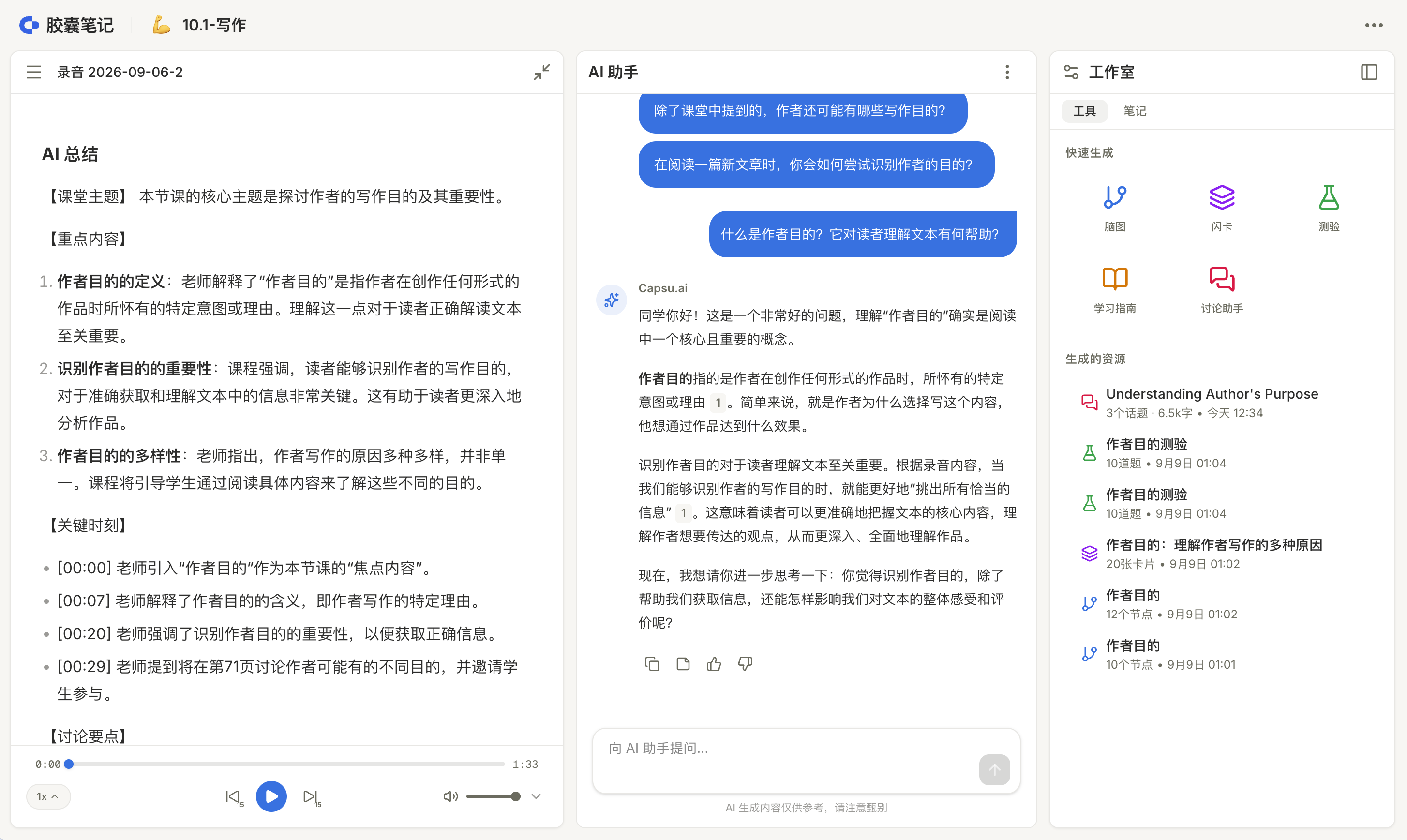
Caption: Course content, AI assistance and study tools sit side by side. This screenshot shows the summary view in the left pane. Select the image to view it at full size. Screenshots show the Chinese interface.
1. Live interpretation designed for international classrooms
capsu.ai's live interpretation supports 29 languages, with support for specialist terminology and different lecturer accents. In a technical course, the challenge is often the combination of unfamiliar vocabulary, fast speech and dense explanations. Live text and translation give you another way to follow the material before a missed sentence turns into a missed argument.
Terminology recognition and accent handling are central to this classroom experience. Test them with your own module: check the important terms and whether the translation preserves the meaning. Audio quality, background noise and overlapping speech still affect results; verify important numbers, formulas and conclusions against the recording.
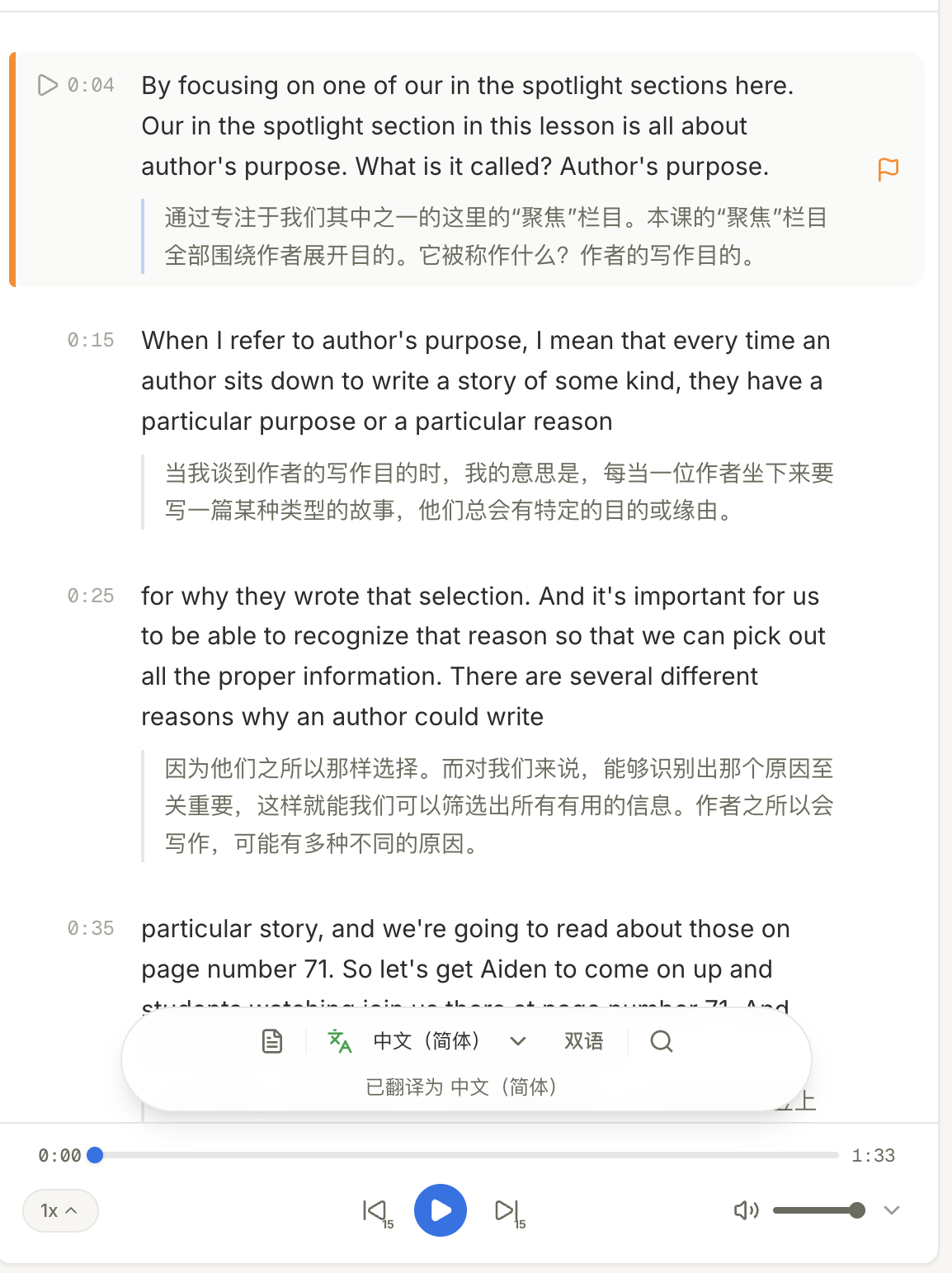
Caption: Follow bilingual text and use timestamps and playback to revisit an unclear passage. Select the image to view it at full size. Screenshots show the Chinese interface.
2. Ask the assistant about the recording
Saving a lecture is only the beginning. You may still need to understand why the professor chose an example or how two concepts relate.
capsu.ai lets you send a recording to the AI assistant and ask questions about the parts you do not understand. For example:
Using this lecture recording, explain what the professor is trying to show with this example. Separate the explanation in the recording from any additional interpretation, and flag anything unclear.
The recording becomes material you can actively work with, rather than another file waiting to be replayed. You still check the explanation, but the capture-to-question workflow is already part of the product.
3. Export recordings and create a summary in one click
capsu.ai supports recording export and one-click summarisation. After class, use the summary to recover the lecture structure, then keep the important points, your questions and useful explanations in your notes. Return to the recording when you need the original wording.
The three panes serve connected purposes: follow the lecture, understand it and preserve something useful for later. When class ends, you have a starting point for your next study session, not just a recording.
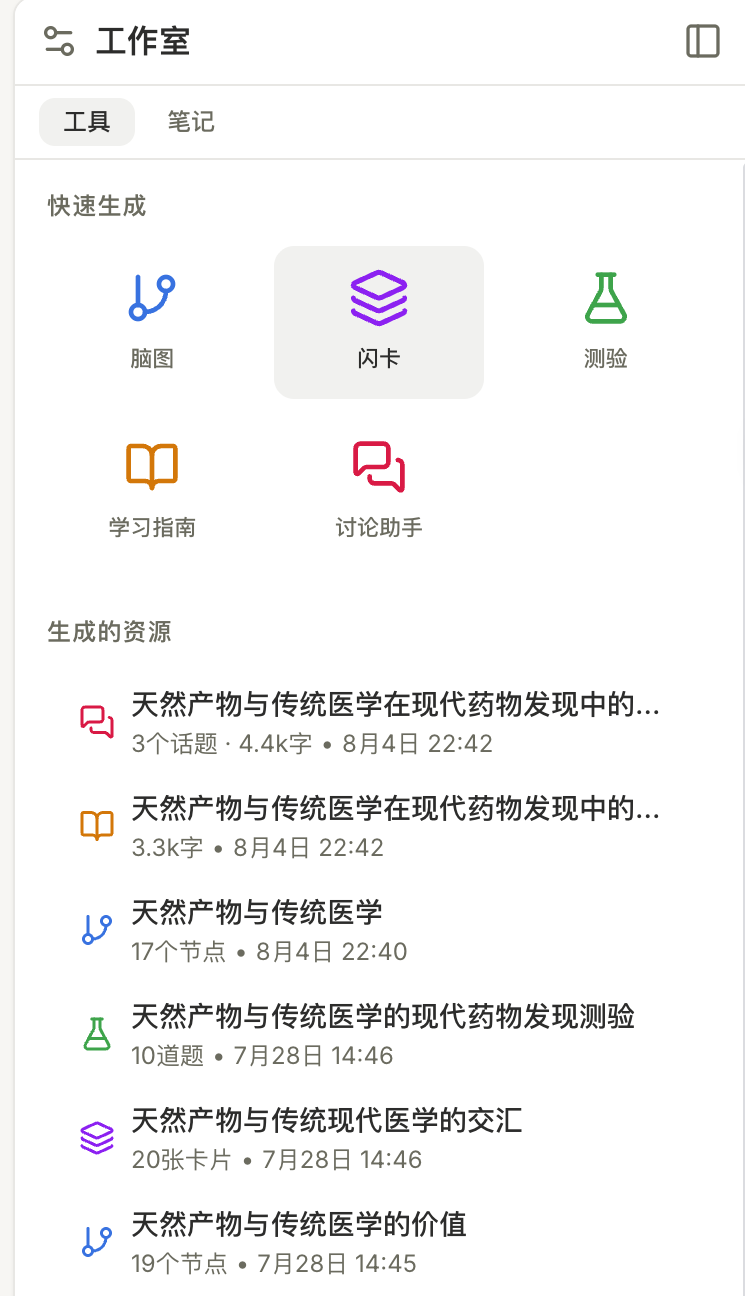
Caption: Create mind maps, flashcards, quizzes, study guides and discussion resources when you need them. Select the image to view it at full size. Screenshots show the Chinese interface.
Build a personal library that supports future learning
capsu.ai is built specifically for international students. Its materials, classroom records, notes and follow-up questions are organised around continued learning. Over time, they can become a small personal learning library: checked terminology, useful lecture explanations, readings and your own observations remain available to revisit.
“Remembering for you” means preserving those materials and records so that you can recover them, revise and continue asking questions. As you add content, the workspace can act more like a study assistant with your course materials at hand, supporting readings, seminars, assignment preparation and revision.
It does not mean the AI learns the course on your behalf or automatically retrieves every note. Check which materials are in scope and verify important conclusions. The library becomes useful through the combination of preserved sources and your own understanding.
ChatGPT Projects can also retain files and context. It would be wrong to say ChatGPT cannot support memory or a learning library. The distinction is how much of the structure and workflow you design yourself. capsu.ai makes interpretation, questions, summaries and follow-up study part of a dedicated international-student experience. ChatGPT offers flexibility to build your system; capsu.ai gives you a study workflow to start using.
Compare one real study week
Consider this example workflow—not a measured time-saving claim.
On Monday, record a lecture with permission and mark two unclear moments. Check the transcript and save your own questions.
On Wednesday, add the relevant reading and compare its reasoning with the lecturer's example. Verify the important passages, keeping the AI's interpretation separate from what the sources actually say.
Before Friday's seminar, prepare one position, one supporting source and one objection. At the weekend, try recalling the argument before opening your notes, then use questions to find gaps.
Judge each tool by three outcomes: how easily you recover evidence, how much material you move between tools and whether you can explain the topic afterwards. The length of a generated answer is a poor substitute for those checks.
Should you switch if you already use ChatGPT?
Keep using ChatGPT if you mainly need occasional explanations or already have a reliable system for course materials. A new tool should earn its place.
Try capsu.ai for one demanding module if you repeatedly upload the same materials, lose track of lecture evidence or collect summaries without becoming better prepared for discussions. Its stronger fit is the continuity between capture, understanding and practice.
You can also use both: keep course materials and checked learning notes in capsu.ai, and use ChatGPT for broader brainstorming or questions beyond the course. Whether two tools justify their cost depends on your actual use and budget.
FAQ: accuracy, essays and academic integrity
Is capsu.ai more accurate than ChatGPT?
This comparison does not establish an accuracy advantage. Both require checking. Being able to return to a source helps you verify an answer; it does not guarantee that the answer is correct.
Can AI help with an essay?
Follow your module's policy. Where permitted, AI can help unpack a question, discuss an outline or review reasoning and language. You remain responsible for the argument, citations and submitted work. Do not invent references or present generated work as unaided work, and disclose assistance when required.
Can I record lectures or upload course materials?
Do not assume permission. Check recording rules, upload rights and institutional data requirements, especially when recordings include other students or materials contain unpublished or sensitive information.
Which should I try first?
For a one-off question, start with the ChatGPT account you already know. If your coursework process repeatedly breaks between lectures, readings and revision, try capsu.ai with one module and assess whether it makes evidence easier to recover and studying easier to continue.
Already have enough AI answers, but need a more connected study routine? Start with one reading or a lecture you have permission to record in capsu.ai.